
Difference between 2.4 GHz vs 5 GHz Wi-Fi Bands
The main difference between 2.4 GHz vs 5 GHz Wi-Fi bands lies in their speed, range, and interference. The 2.4 GHz band offers a longer range and better wall penetration, while the 5 GHz band provides significantly faster speeds over a shorter distance with less interference. This is crucial for UK consumers, especially with the widespread rollout of Full Fibre broadband from providers like Vodafone, Sky, and BT, where maximum speeds (measured in Mbps) are a key selling point.
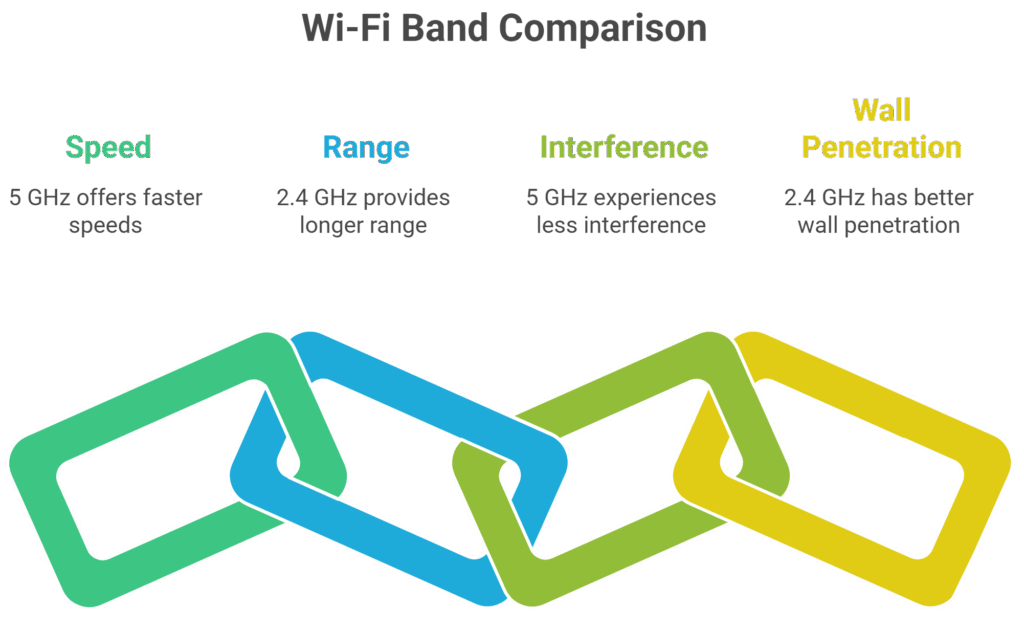
Table of Contents
hide
What is 2.4 GHz Wi-Fi?
The 2.4 GHz frequency band is the traditional standard for Wi-Fi. It’s excellent for covering larger areas of a home, making it ideal for devices that are further from the router. Its longer wavelength allows it to penetrate solid objects like walls more effectively than 5 GHz.
Key Characteristics:
- Wavelength: Longer wavelength, better at penetrating walls and objects.
- Range: Provides a wider coverage area.
- Speed: Slower, with typical real-world speeds rarely exceeding 100 Mbps.
- Interference: Highly susceptible to interference from other household devices like microwaves, cordless phones, and Bluetooth devices, as they often operate on the same frequency. This can lead to higher latency and slower upload speed.
What is 5 GHz Wi-Fi?
The 5 GHz frequency band is a more modern standard designed for high-performance connections. It delivers faster speeds and a more stable connection because it uses a wider range of channels, meaning less congestion and interference from other devices.
Key Characteristics:
- Wavelength: Shorter wavelength, more easily obstructed by walls and objects.
- Range: Shorter coverage area.
- Speed: Significantly faster, capable of supporting gigabit speeds for Full Fibre and Fibre to the Cabinet packages.
- Interference: Much less prone to interference due to fewer devices using this frequency band.
How to Choose the Right Band for Your Home

The optimal band choice depends on the device and its location. Most modern routers, including those supplied by major UK providers, are dual-band, meaning they broadcast both frequencies. Some even use a feature called “band steering” to automatically connect your device to the best band.
- For speed-critical activities: Use 5 GHz for devices used for 4K streaming, online gaming, and large file downloads. Place these devices closer to your router for the best experience.
- For range and stability: Use 2.4 GHz for devices that are further away from the router, such as smart home devices, security cameras, or laptops used in a different room.
A Quick Comparison Table
The following table provides a side-by-side comparison to help you understand the differences at a glance.
| Feature | 2.4 GHz | 5 GHz | Best Use Case |
|---|---|---|---|
| Speed | Slower (up to 100 Mbps) | Faster (200+ Mbps, Gigabit) | 5 GHz for speed-intensive tasks. |
| Range | Longer | Shorter | 2.4 GHz for devices far from router. |
| Interference | High (e.g., microwaves, Bluetooth) | Low (less common devices) | 5 GHz for a more stable connection. |
| Wall Penetration | High | Low | 2.4 GHz for signal through obstacles. |
Related Articles

Vodafone Broadband Review and Deals
Vodafone Broadband Review and Deals: How Does Vodafone Broadband Compare? Vodafone has quickly become one of the UK’s most popular broadband providers, offering affordable fibre packages, ultrafast full fibre speeds, and competitive extras such as its Wi-Fi guarantee and optional 4G backup. As one of the leading names in both mobile and broadband, Vodafone appeals […]

5g Broadband Internet
Is 5G Broadband Actually Worth It? 5G broadband is fixed wireless access (FWA). A router at your address connects to the nearest 5G mast over the same radio spectrum used for mobile data, then converts that signal into…
2.4 GHz vs 5 GHz Frequently Asked Questions (FAQ)
Is it better to connect to 2.4 or 5GHz?
It depends on your needs. For high-speed, high-bandwidth activities like 4K streaming and gaming, 5 GHz is better. For general use and smart home devices that require a stable, long-range connection, 2.4 GHz is often the more reliable choice.
Does 5GHz WiFi go through walls?
No, not very well. The shorter wavelengths of the 5 GHz band make it less effective at penetrating solid objects like walls, floors, and furniture. This is why it has a shorter range compared to the 2.4 GHz band.
How do I connect 2.4 GHz to WiFi instead of 5?
The easiest way is to separate the two bands in your router's settings and give them different names (e.g., "MyWiFi-2.4GHz" and "MyWiFi-5GHz"). You can then manually select the 2.4 GHz network from your device's Wi-Fi menu.
What are the disadvantages of 5GHz WiFi?
The main disadvantages of 5 GHz Wi-Fi are its shorter range and poor wall penetration. This means that if you're not in the same room as your router, your connection may be slow or unstable. It is also not compatible with some older devices.
Does turning off 5GHz improve WiFi?
No, turning off the 5 GHz band will not improve your Wi-Fi signal. In fact, it will likely reduce your network's overall performance by removing the fastest band. It's best to leave both on so that your devices can choose the optimal band.
How many devices can connect to 2.4 GHz WiFi?
The number of devices is not limited by a specific number, but by the network's total bandwidth. A high number of connected devices can slow down the 2.4 GHz network due to congestion and interference.
Should a smart TV be on 2.4 or 5GHz?
A smart TV should be on the 5 GHz band to ensure a smooth, buffer-free streaming experience, especially when watching 4K or high-definition content. However, if your TV is far from the router, you may need to use the 2.4 GHz band to maintain a stable connection.
Is 2.4 GHz WiFi obsolete?
No, the 2.4 GHz band is not obsolete. It remains a vital part of modern networking due to its superior range and compatibility with a vast number of devices, particularly smart home devices.
How do I know if my router has too many devices?
You'll notice a significant slowdown in your internet speed, especially when multiple people are streaming, gaming, or downloading at the same time. The best way to check is to log into your router's admin interface to see a list of all connected devices.
What happens if I change my router from 5GHz to 2.4 GHz?
Your devices will switch to the 2.4 GHz band, resulting in a longer range but slower speeds. This could be beneficial if you have a large home with poor signal in some areas but will likely negatively impact performance for speed-intensive tasks.
Which Wi-Fi band is best?
Neither band is universally "best"; they are designed for different purposes. The 5 GHz band is best for performance, and the 2.4 GHz band is best for range.
Should I separate 2.4 and 5GHz on my router?
It can be helpful to separate the bands if you're experiencing connectivity issues or want to manually control which devices connect to which band. However, for most users, it's better to use a single network name and let the router's band steering feature manage the connections.
Does a closed door affect WiFi?
Yes, a closed door, especially a solid or thick one, can affect your Wi-Fi signal. It acts as an obstacle that can absorb or block the signal, particularly for the 5 GHz band, leading to a weaker connection
Should I disable one of the bands on my router?
Unless you are experiencing specific, consistent issues, it is generally recommended to keep both bands enabled. This allows your devices to automatically switch to the most suitable band, ensuring a seamless connection across your home.