
Onestream Broadband Deals and Review – Are they any good?
Onestream Broadband Comprehensive Review
 Finding the right broadband provider can be tricky, especially with so many options available. If you’re looking for affordable, reliable internet in the UK, Onestream Broadband might be worth considering.
Launched in 2018, Onestream aims to offer budget-friendly packages with competitive speeds, making high-speed internet more accessible.
In this article, we’ll dive into Onestream’s broadband packages and services, their latest broadband deals, strengths and weaknesses, and whether they are the right choice for your home.
Who are Onestream Broadband?
Onestream is a relatively new player in the broadband market, launched in 2018. They aim to disrupt the broadband industry with their budget-friendly offerings and a strong focus on customer satisfaction. Onestream provides a variety of broadband packages, including both fibre and full-fibre options, catering to different customer requirements.
Onestream Broadband Packages in October 2026
Onestream Broadband: The Value-Focused National Provider
Onestream has carved out a niche by offering some of the most competitive entry-level prices in the UK. Utilising the Openreach network, they provide a mix of standard Fibre and Full Fibre (FTTP) connections. While they don’t offer symmetrical upload speeds, they excel at providing straightforward, no-frills internet for budget-conscious households. Most plans come with a 24-month commitment, though 12-month options are often available for those needing more flexibility.
Onestream Fibre 40 ‐ 38Mbps
- Average Download Speed: 38Mbps
- Average Upload Speed: 9Mbps
- Contract Length: 24 Months
- Recommended For: Single occupants or couples with basic browsing needs.
- Onestream 38 Brief Review: This is a solid entry-level choice for those who primarily use the internet for web browsing, social media, and checking emails. It can handle a single HD stream comfortably, making it a great pick for individuals living alone. However, busy households with multiple devices running at once might find the bandwidth stretched thin.
Onestream Fibre 80 ‐ 67Mbps
- Average Download Speed: 67Mbps
- Average Upload Speed: 18Mbps
- Contract Length: 24 Months
- Recommended For: Small families and casual Netflix streamers.
- Onestream 67 Brief Review: As the most popular speed tier in the UK, this 67Mbps plan hits the sweet spot between price and performance. It easily manages multiple HD streams and smooth video calling for those working from home. It is a reliable workhorse for small families who want decent speeds without a premium price tag.
Supreme Full Fibre 115 ‐ 100Mbps
- Average Download Speed: 100Mbps
- Average Upload Speed: 18Mbps
- Contract Length: 24 Months
- Recommended For: Busy households and active remote workers.
- Onestream 100 Brief Review: Moving into the “Full Fibre” category, this plan offers a significant stability boost over standard fibre. The 100Mbps download speed is perfect for households where several people are online at once, including gaming and 4K streaming. It provides a much more robust experience for home offices during peak hours.
Supreme Full Fibre 220 ‐ 200Mbps
- Average Download Speed: 200Mbps
- Average Upload Speed: 26Mbps
- Contract Length: 24 Months
- Recommended For: Gamers and households with many smart devices.
- Onestream 200 Brief Review: This tier is designed for the modern connected home where everything from the fridge to the doorbell is online. With 200Mbps, large game updates download much faster, and 4K content buffers almost instantly. It offers plenty of headroom, ensuring that one person’s heavy usage won’t lag the rest of the house.
Supreme Full Fibre 550 ‐ 500Mbps
- Average Download Speed: 500Mbps
- Average Upload Speed: 66Mbps
- Contract Length: 24 Months
- Recommended For: Content creators and large, tech-heavy families.
- Onestream 500 Brief Review: At 500Mbps, you are entering the world of ultrafast connectivity. This is ideal for users who frequently download huge files or creators who need the higher 66Mbps upload speed for sending video content to the cloud. It’s more speed than the average user needs, but it provides total peace of mind for heavy data users.
Hyperstream Full Fibre 1000 ‐ 900Mbps
- Average Download Speed: 900Mbps
- Average Upload Speed: 101Mbps
- Contract Length: 24 Months
- Recommended For: Power users and “gigabit” enthusiasts.
- Onestream 900 Brief Review: This is the flagship Onestream package, offering top-tier speeds that rival the biggest names in the industry. It is built for households where multiple people are simultaneously gaming, streaming in 8K, and running intensive cloud applications. If you want the fastest available connection Onestream offers, this is the one.
Searching for Broadband Providers in Your Area?
Enter your postcode to compare the most up-to-date broadband deals across the UK’s major broadband providers.
Onestream Broadband Review Table of Contents
hide
Onestream Broadband Packages and Speeds
Onestream Broadband offers several packages using FTTC and FTTP technologies.
FTTC (Fibre to the Cabinet) uses fibre optic cables up to a street cabinet, but the final connection to your home relies on slower copper wires, limiting speed and stability. FTTP (Fibre to the Premises), on the other hand, delivers fibre optic cables directly to your home, offering much faster and more reliable internet. FTTP is ideal for heavy internet users, while FTTC is more widely available but slower
- Onestream FTTC Packages: Supreme Full Fibre 40, Supreme Full Fibre 80,
- Onestream FTTP Packages: Supreme Full Fibre 115, Supreme Full Fibre 220, Supreme Full Fibre 550, and Supreme Full Fibre 1000.
Below is a breakdown of the available broadband packages, highlighting their download speeds and the types of users they are best suited for. These packages are competitively priced, and often undercut bigger broadband providers such as BT Broadband, Sky, Plusnet, VirginMedia and TalkTalk.
| Package | Download Speed | Suitable For |
|---|---|---|
| Supreme Full Fibre 40 | 38 Mbps | Small households (up to 2 users) – general browsing and streaming |
| Supreme Full Fibre 80 | 74 Mbps | Medium households (multiple users and devices) – streaming and occasional gaming |
| Supreme Full Fibre 115 | 100 Mbps | Medium to large households – streaming, gaming, and video conferencing |
| Supreme Full Fibre 220 | 200 Mbps | Heavy internet users – high-quality streaming, gaming, and remote work |
| Supreme Full Fibre 550 | 500 Mbps | Large households with multiple devices – intensive streaming and gaming |
| Supreme Full Fibre 1000 | 1000 Mbps | Ultra-fast broadband needs – professional streaming, gaming, and large data transfers |
Onestream Broadband Setup & Installation
Onestream offers both FTTC (Fibre to the Cabinet) and FTTP (Fibre to the Premises) broadband options, each with different installation processes.
- FTTC Installation: Since FTTC relies on existing copper phone lines, installation is relatively simple. If your home already has a compatible phone socket, activation can be done remotely, usually within a few days. If a new socket is required, an engineer visit may be needed, which can extend the setup time.
- FTTP Installation: FTTP requires a fibre-optic cable to be installed directly into your home. This process involves an engineer visit to install an Optical Network Terminal (ONT), which connects to your router. Installation typically takes longer than FTTC, often requiring several weeks for scheduling and setup.
- Activation & Setup Fees: Onestream may charge setup fees depending on the package and installation type. FTTP installations often have higher setup costs due to the additional equipment and engineer work required.
Related Articles

Sky Broadband Review and Deals
Sky Broadband Review and Deals: Is Sky Broadband any Good? Sky is one of the UK’s most popular and well-established providers, renowned for its all-encompassing TV, broadband, and mobile packages. But does its broadband service stand up on its own merits, or is it simply a convenient add-on? This comprehensive broadband sky review dives deep […]

The Benefits of High-Speed Broadband for Remote Work
As remote work becomes more prevalent, the importance of high-speed broadband cannot be overstated. With a reliable internet connection, remote workers can access company data, communicate with colleagues, and complete tasks in a timely and efficient manner. Benefits of high-speed broadband for remote work In this article, we will explore the benefits of high-speed broadband […]
Onestream Broadband Router Options
Onestream offers several router options depending on the broadband package you choose. While these routers are functional, they are fairly basic compared to those provided by some other broadband providers.
- TP-Link TD-W9960 – A standard VDSL2 modem-router, mainly supplied with FTTC (Fibre to the Cabinet) plans. It supports up to 300 Mbps on 2.4GHz Wi-Fi and has four Fast Ethernet ports. This router is suitable for light use but may struggle with speed and range in larger homes. – More technical information on the TP-Link TD-W9960.
- TP-Link Archer VR400 – A more advanced option available with full fibre packages. It supports dual-band Wi-Fi (2.4GHz and 5GHz) and can reach speeds of up to 867 Mbps on the 5GHz band. It also includes Gigabit Ethernet ports and Beamforming technology for stronger signal targeting, making it a good mid-range choice. – More technical information on the TP-Link Archer VR400.
- Technicolor TG588v2 – An older model sometimes included with entry-level packages. It supports basic wireless speeds and has limited range, making it less ideal for modern usage, especially for full fibre plans or households with multiple devices. – More technical information on the Technicolor TG588v2.
While these routers can get you started, they may not be the best choice for larger homes or users who require strong Wi-Fi performance. Onestream allows customers to use their own routers, which can improve network performance and avoid rental fees. If you already have a high-quality router or a mesh Wi-Fi system, using your own equipment may be a better option for ensuring stable and fast internet connectivity.
Is Onestream broadband good for gaming?
Onestream Broadband provides decent speeds for gaming, but competitive players may experience occasional latency spikes. Since Onestream operates on the Openreach network, congestion during peak hours can lead to increased ping times, which can affect fast-paced online games.
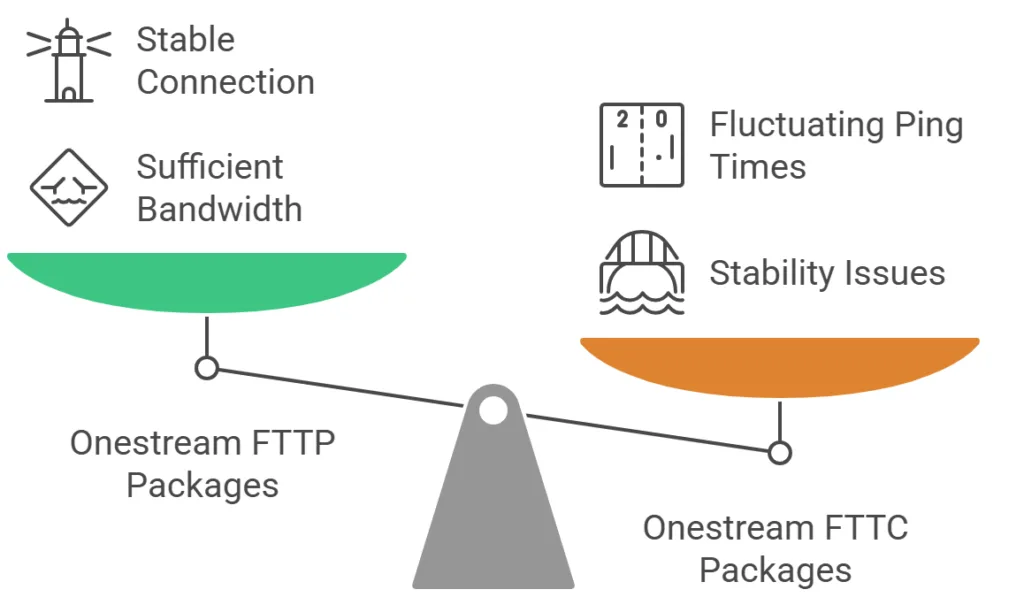
- Speed & Stability: Onestream’s full fibre packages, particularly Supreme Full Fibre 220 and above, offer sufficient bandwidth for gaming. However, FTTC plans may struggle with stability due to reliance on copper wiring.
- Latency & Ping: While speed is important, latency plays a bigger role in gaming performance. Onestream’s network can experience fluctuations in ping times, especially in areas with high traffic.
- Multiplayer & Cloud Gaming: Casual multiplayer gaming should work fine on most Onestream fibre plans, but cloud gaming services like Xbox Cloud Gaming or GeForce Now may require a more stable connection.
Overall, Onestream is a solid choice for casual gaming, but serious gamers may want to explore alternatives with lower latency and more consistent network performance.
Onestream Customer Service and Support
Onestream’s customer service has received mixed reviews, with some users reporting difficulties in reaching support and resolving issues.
- Support Availability: Customers can contact Onestream via phone and live chat, but response times vary. Some users have experienced delays in getting assistance, particularly for technical or billing concerns.
- Service Quality: While some customers report satisfactory experiences, others have faced challenges in resolving queries, particularly when dealing with faults or contract-related issues.
- Common Complaints: Billing discrepancies, slow response times, and difficulty in reaching customer service representatives are among the most frequently mentioned concerns.
Pros and Cons of Onestream Broadband
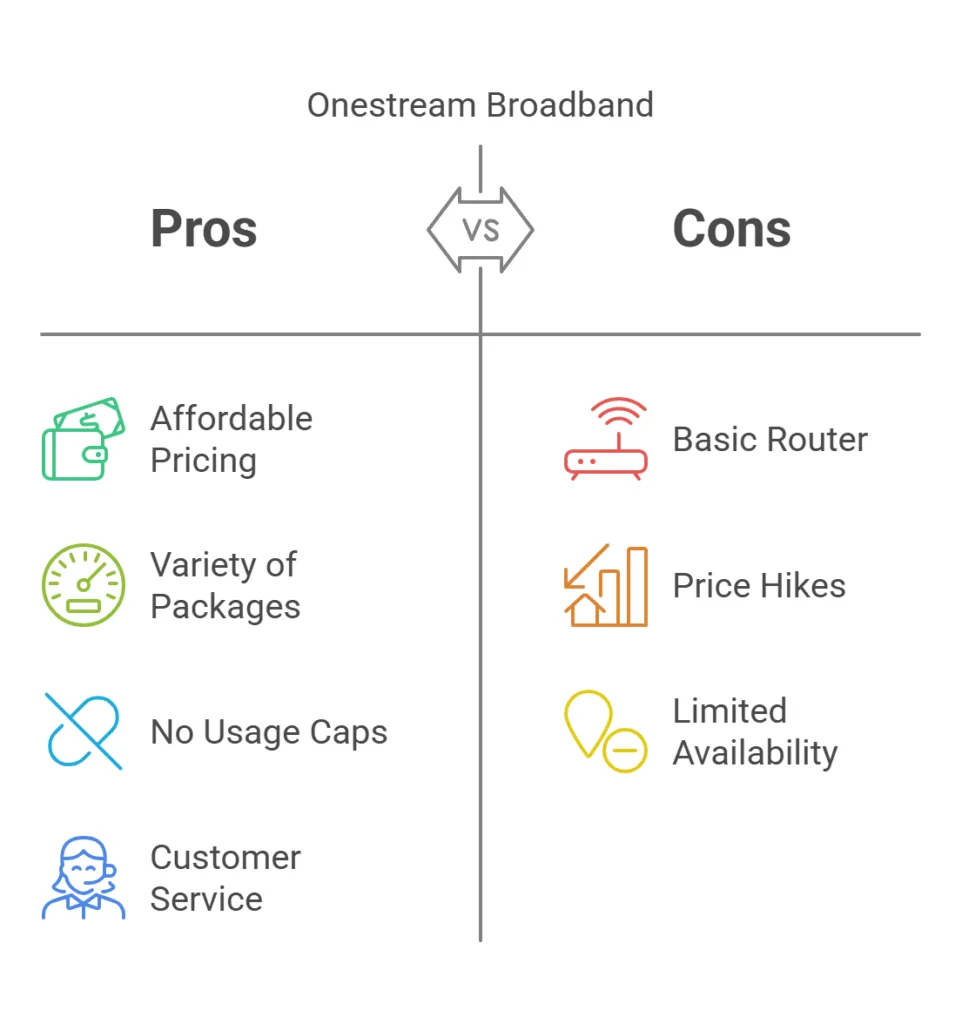 Onestream broadband Pros:
- Affordable Pricing: Onestream’s packages are budget-friendly, making high-speed internet accessible to more people.
- Variety of Packages: With multiple speed options, there’s a package for every type of user.
- No Usage Caps: Enjoy unlimited downloads with no data restrictions.
- Customer Service: Generally positive reviews about the helpfulness and efficiency of the support team.
Onestream broadband Cons:
- Basic Router: The router provided by Onestream may not be as advanced as those offered by competitors.
- Mid-Contract Price Hikes: Some plans are susceptible to price increases during the contract period.
- Availability: Full-fibre options are not available everywhere, limiting choices for some users.
Onestream vs BT, Plusnet, Sky, and Virgin Media
Choosing the right broadband provider depends on factors like speed, reliability, customer service, and additional features.
Here’s how Onestream compares to BT, Plusnet, Sky, and Virgin Media.
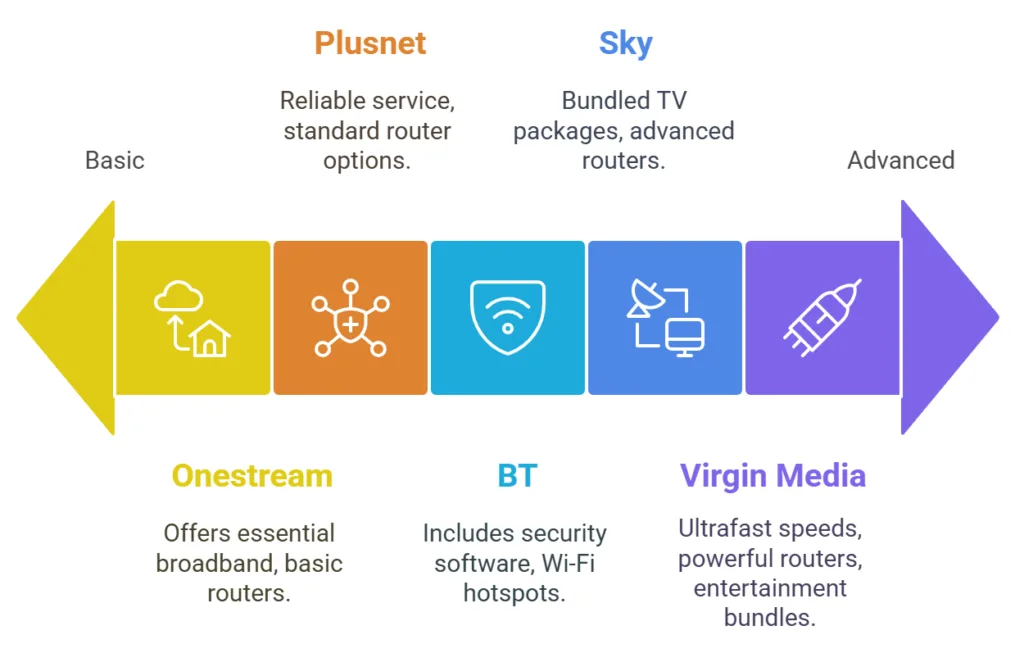
- Network & Availability: Onestream, BT, Plusnet, and Sky all use the Openreach network, meaning their coverage and speeds are similar in most areas. Virgin Media operates on its own independent fibre network, often providing faster speeds where available.
- Speed Options: Onestream offers both FTTC and FTTP plans, with speeds ranging from 38 Mbps to 1000 Mbps. BT and Sky provide similar speed tiers, while Virgin Media offers ultrafast speeds up to 1130 Mbps, making it a strong choice for high-demand users.
- Router Quality: Onestream’s routers are basic and often rented separately. BT and Sky provide more advanced routers with better Wi-Fi coverage, while Virgin Media’s Hub 5 is one of the most powerful options available.
- Customer Service: Onestream has mixed reviews, with some customers reporting issues with billing and cancellations. BT and Plusnet generally receive better ratings for customer support, while Virgin Media’s service can be inconsistent.
- Extras & Features: BT includes security software and access to Wi-Fi hotspots, while Sky offers bundled TV packages. Virgin Media provides fast speeds and entertainment bundles, but its pricing can be higher.
Overall, Onestream is a budget-friendly option, but it lacks some of the premium features and customer service quality of larger providers. If affordability is your priority, Onestream may be worth considering, but if you want better support and extras, BT, Sky, Plusnet or VirginMedia could be better choices.
Onestream Broadband Cancellation Policy
Cancelling Onestream Broadband requires careful attention to contract terms, as some users have reported unexpected fees.
- Cooling-Off Period: Customers have a 14-day cooling-off period from the start of their contract, during which they can cancel without penalty. This applies to new contracts but may not cover renewals, so it’s important to check the terms before signing up.
- Cancellation Process: Customers must provide a 30-day notice and contact Onestream’s support team by phone, as cancellations cannot be processed via live chat.
- Early Termination Fees: If a contract is ended before the agreed term, early exit fees may apply. These fees depend on the remaining contract length and package type
How to contact Onestream support team
You can contact Onestream Broadband’s support team in the following ways:
- Phone: 0333 241 4449
- Live Chat: Available on their website during support hours
- Opening Hours:
- Monday to Friday: 9am – 7:30pm
- Saturday & Sunday: 9am – 4pm (Sunday support is for technical queries only)
- Address: Onestream, Unit 15, Fulcrum 2, Solent Way, Fareham, PO15 7FN
For more details, visit their support page or customer service section.
Conclusion
Onestream Broadband offers a compelling mix of affordability, variety, and customer service.
While there are some drawbacks, such as the basic router and potential mid-contract price hikes, the overall value provided by Onestream makes it a strong contender in the broadband market. If you’re in the process of looking for a new broadband package deal, Onestream is worth considering.