
Community Fibre TV Review – Is it any good?
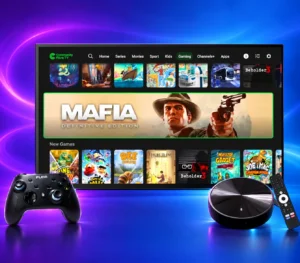
Community Fibre TV is an optional TV service for Community Fibre broadband customers. The new service uses a Netgem PLEIO puck to bring live channels, catch-up apps, streaming services and cloud games together on your TV, according to Community Fibre’s product information.
Community Fibre lists the TV add-on at £12 a month with a 24-month broadband package or £17 a month with a 12-month package, and says existing broadband customers must renew their broadband contract to add it. The TV fee is on top of broadband, so the right question isn’t just whether the box looks useful. It’s whether the channels and features are worth the extra cost and commitment for your household. Check Community Fibre’s current TV terms.
At a glance
- TV add-on: £12 a month with a 24-month broadband package, or £17 a month with a 12-month package.
- TV-only cost over the stated term: £288 over 24 months or £204 over 12 months, based on the advertised monthly fees. Broadband is extra.
- Equipment: the new service uses a Netgem PLEIO 4K puck. Community Fibre also has customers with older Netgem TV boxes.
- What it brings together: live TV, catch-up and streaming apps, plus games on the new puck.
- Existing customers: Community Fibre says you must renew your broadband contract to add TV.
It’s worth considering if you already want Community Fibre broadband and will use the live channels, apps or games. It’s a poor fit if you’re looking for premium sport included in the price, traditional recording, or TV that keeps working when broadband is down.
Community Fibre Coverage Checker and Best Deals in November 2026
Use the Community Fibre coverage checker below to see if Community Fibre is available in your area. If Community Fibre isn’t available at your address, the checker will show deals from providers that serve your address.
Community Fibre broadband packages with TV
Compare Community Fibre broadband packages with its TV service added. Prices are shown by speed and contract length.
Add Community Fibre TV to your broadband package
Community Fibre TV costs £12 a month with a 24-month broadband package or £17 a month with a 12-month package. Paid streaming subscriptions cost extra.
Community Fibre 100 Mbps broadband with TV
- Average download speed: 100 Mbps
- Average upload speed: 100 Mbps
- Contract: 24 months
- Setup: £0
- Our view: The lowest-speed option in this selection, suited to lighter everyday use and households that don’t need several demanding streams or large downloads at once.
- Monthly price: From £26/month with TV (£14 broadband + £12 TV).
Community Fibre 300 Mbps broadband with TV
- Average download speed: 300 Mbps
- Average upload speed: 300 Mbps
- Contract: 12 months
- Setup: £0
- Our view: A practical middle option for busy homes with several devices, while the shorter broadband commitment may suit readers who don’t want a two-year term.
- Monthly price: From £42/month with TV (£25 broadband + £17 TV).
Community Fibre 500 Mbps broadband with TV
- Average download speed: 500 Mbps
- Average upload speed: 500 Mbps
- Contract: 24 months or 12 months
- Setup: £0
- Our view: The 24-month offer starts lower, but its TV charge is paired with a longer broadband term. The 12-month version costs more each month once the higher TV fee is included, but gives you an earlier point to review the deal.
- Monthly price: From £28/month on 24 months (£16 broadband + £12 TV). On 12 months, it’s from £45/month (£28 broadband + £17 TV).
Community Fibre 1 Gbps broadband with TV
- Average download speed: 1 Gbps
- Average upload speed: 1 Gbps
- Contract: 24 months or 12 months
- Setup: £0
- Our view: A strong fit for households moving large files, using several high-demand devices or wanting equal upload and download speeds. Most homes won’t need a gigabit connection just to stream TV.
- Monthly price: From £32/month on 24 months (£20 broadband + £12 TV). On 12 months, it’s from £47/month (£30 broadband + £17 TV).
Community Fibre 2 Gbps broadband with TV
- Average download speed: 2 Gbps
- Average upload speed: 2 Gbps
- Contract: 24 months
- Setup: £0
- Our view: This is aimed at unusually demanding homes with compatible multi-gigabit equipment. A standard TV stream won’t use anything close to the full speed, so choose it for the household’s wider network needs, not the TV service alone.
- Monthly price: From £37/month with TV (£25 broadband + £12 TV).
Community Fibre Premium 5 Gbps broadband with TV
- Average download speed: 5.1 Gbps
- Average upload speed: 5 Gbps
- Contract: 24 months
- Setup: £0
- Our view: A specialist multi-gigabit tier for a home with compatible wired equipment and a clear need for very high capacity. It’s difficult to justify on TV viewing alone.
- Monthly price: From £75/month with TV (£63 broadband + £12 TV).
The checker shows broadband deals, not the TV add-on. Community Fibre TV costs extra. If you want a full review of current Community Fibre broadband deals and packages, use our Community Fibre November 2026 broadband packages review.
How much does Community Fibre TV cost?
Community Fibre lists two TV prices, each tied to a broadband contract length:
| Broadband term | TV add-on per month | TV add-on over that term |
|---|---|---|
| 12 months | £17 | £204 |
| 24 months | £12 | £288 |
These totals are for the TV fee only. They don’t include broadband, and they assume the listed monthly TV charge applies throughout the stated term. Check the order summary for the amount you’ll actually pay.
The 24-month option costs £60 less for TV during its first 12 months, compared with paying £17 a month for a 12-month term. But you’re signing up for another year. Across the full two years, the TV fees total £288. That’s not a like-for-like comparison with the 12-month option, and it doesn’t tell you what a broadband renewal would cost after the first year.
There’s no setup fee for the TV service, according to Community Fibre. The provider’s current product page also says that existing broadband customers have to renew their broadband contract when adding TV. Ask for the new broadband price and contract end date as well as the TV fee. A low add-on price isn’t the whole deal if it restarts a broadband commitment you weren’t planning to take.
What do you get with Community Fibre TV?

The new service centres on a small PLEIO puck that connects to your television with HDMI and uses your broadband connection for live TV, apps and games. Community Fibre says the package includes its TV box, remote, controller and power adapter. Netgem describes the launch as a new broadband-delivered service combining Freely, streaming and cloud gaming. It’s designed to put several types of viewing in one place, rather than deliver a traditional satellite-style package of premium channels.
What is Freely?
Freely streams live UK public-service broadcaster channels and catch-up programmes over broadband. It removes the need for an aerial, but the TV still needs an internet connection.
TV Licensing rules still apply. You need a licence if you watch live TV on any channel or use BBC iPlayer, including through an internet-connected TV device. Check the official TV Licensing rules for your circumstances.
The service includes live channels and apps such as BBC iPlayer, ITVX, YouTube and TikTok. The puck also supports paid services including Netflix, NOW, Prime Video and Discovery+. Those subscriptions may cost extra. Having an app on the box doesn’t mean its shows or premium channels are included in the Community Fibre TV fee.
Community Fibre’s own pages don’t use one consistent headline count. Its product page advertises 240+ live channels and 45+ free games. Its help page describes 200+ channels for the new puck and 230+ for older boxes. Netgem’s launch announcement refers to 150+ additional channels and more than 300 cloud-game titles. The sources don’t explain how those figures relate to each other, so don’t treat them as interchangeable totals. Check the current channel list for the programmes you actually watch.
That matters more than a big number. If you mainly watch the main UK broadcasters and use catch-up apps, the included service may cover what you need. If you’re paying for TV because you want Sky Sports or TNT Sports, budget for the relevant separate subscription too. Community Fibre’s page lists Discovery+ Premium, which includes TNT Sports, and NOW among the services you can add. Their prices and terms are separate from the TV add-on.
The new PLEIO puck and older Community Fibre TV boxes
Community Fibre’s TV service has changed. The newer PLEIO puck streams live channels over broadband, so it doesn’t need an aerial. It also adds cloud gaming and comes with a wireless controller, according to Community Fibre’s setup guidance.
Some customers still have an older Netgem box. Community Fibre’s help page says the legacy box can receive Freeview through an aerial and record Freeview channels to a USB stick. You can’t watch a different Freeview channel while recording. The provider’s product page also mentions USB recording in a general FAQ, so its public pages don’t make clear whether that answer applies to every box. If recording matters to you, ask Community Fibre to confirm which equipment you’ll receive and what it can record before you sign up.
What are the PLEIO puck and older Netgem TV box?
The PLEIO puck is Netgem’s compact streaming device used for Community Fibre’s newer TV service. It plugs into a TV’s HDMI port and streams live channels, apps and games over broadband. The older Netgem TV box is a different device: Community Fibre says it can receive Freeview through an aerial and record some channels to USB. Don’t assume those older-box features work on the PLEIO puck.
The new puck is presented around streaming, catch-up and programme restart, but Community Fibre’s public pages don’t clearly confirm whether it supports the same USB recording as the older box. That may be fine if you normally watch through apps. It’s a genuine drawback if you regularly save live programmes or want TV to work independently from your broadband connection.
Check the equipment-return terms before signing up. Community Fibre’s current terms say its TV box or puck and gamepad must be returned when service ends. They list charges of £80 for an unreturned box and £25 for a gamepad. Confirm the return process and applicable charge in your order documents, especially if you receive different equipment.
What is cloud gaming?
Community Fibre says the new PLEIO service includes access to cloud games and a controller. That’s a useful extra for casual play, but it isn’t a substitute for a console library, and not every game will suit every player.
With cloud gaming, the game runs on a remote computer and streams to your TV, while your controller sends your actions back over the internet. A weak connection or delay can make play feel less responsive.
Community Fibre’s product page and Netgem’s launch announcement give different game counts. Neither tells you whether the catalogue includes the titles your household wants, so check the current selection before signing up.
Related Articles
Rebel Broadband Review and Deals
Key Takeaways: A Quick Rebel Internet Review This comprehensive Rebel internet review finds that Rebel Internet is a premium UK broadband provider that stands out for its straightforward pricing and advanced Wi-Fi technology. It’s an excellent choice for customers who value reliability and a superior in-home experience over the cheapest possible price. Here’s a quick […]

Plusnet Broadband Review and Deals
Plusnet Broadband Review: Is Plusnet broadband any good? Searching for the ideal broadband provider in the UK can feel a little overwhelming. With so many options available, a thorough Plusnet broadband review is essential to help you decide if this popular Internet Service Provider is the right choice for you. Plusnet, a subsidiary of the […]
Does Community Fibre TV need an aerial or broadband?
 The new PLEIO puck gets live TV over broadband, so you don’t need an aerial for its live channels. That makes installation simpler if your home has no aerial connection or you don’t want to run another cable to the TV.
The trade-off is straightforward. The service relies on your broadband. If the connection goes down, live TV through the puck, apps and cloud gaming can stop working too. A weak Wi-Fi signal can also affect streaming. Place the puck where it gets a stable connection, or ask whether you can connect it to your router by Ethernet.
The older Community Fibre box is different. The provider’s help pages say an aerial is needed for traditional Freeview channels on the legacy box. Don’t assume advice for one model applies to the other.
Community Fibre TV alternatives, Sky TV, Virgin Media TV and NOW
Community Fibre TV isn’t the only way to bring live channels, sport or streaming apps into your living room. The right alternative depends on what you watch and whether you want TV bundled with broadband, a traditional channel package or a streaming membership.
Sky TV
Sky Stream delivers Sky TV through a small streaming puck rather than a satellite dish. Sky offers TV subscriptions on either a 31-day rolling or 24-month term. Sky Sports and Sky Cinema can also be added, with the longer term applying across the core Sky TV subscription if you choose a 24-month pack. It’s a stronger fit if you want Sky’s own TV packages and premium add-ons. Check the current Sky Stream package and contract terms before comparing prices.
Virgin Media TV
Virgin Media sells TV with broadband bundles that include channel packs, with options for Sky Sports and Sky Cinema. Its Flex option offers 150+ essential channels and lets customers add or remove selected premium packs and streaming subscriptions on a 30-day cycle. That may suit a household that wants a broader pay-TV bundle, but you’ll need to check Virgin Media broadband and TV availability at your address and compare the full bundle price. See Virgin Media’s current TV packages.
NOW
NOW sells separate Entertainment, Cinema and Sports memberships that you can watch on compatible TVs and streaming devices. It’s the most modular choice here if you only want particular Sky channels, films or sport without changing your broadband package. Some memberships are available on minimum-term plans, so check the cancellation terms as well as the monthly fee. See NOW’s membership options.
You may not need another TV subscription
If you mainly watch free-to-air channels and already have a working aerial, your current setup may be enough. If you mostly watch on demand, check the apps on your smart TV or streaming device before paying for another box or subscription. You’ll still need a TV Licence for live TV or BBC iPlayer.
For a fair comparison, list the channels and services you’ll actually use, then add the broadband price, TV fee, premium subscriptions and contract dates. Don’t compare Community Fibre’s TV add-on fee with a full Sky or Virgin Media bundle as if they include the same things.
Is Community Fibre TV worth it?
It can be good value if you’re already choosing Community Fibre broadband, want a simple way to watch live UK channels and catch-up, and will use the apps or games. You get a single box for those features, and the new puck avoids the need for an aerial.
The 12-month option is the safer fit if you don’t want to lock in broadband for two years. The 24-month option has a lower monthly TV fee, but the second year is a real commitment, not a footnote. Compare the broadband renewal price and the full order total before deciding.
I wouldn’t add it just because “240+ channels” sounds impressive. Community Fibre’s own pages describe the channel and game counts differently, and the headline number doesn’t tell you whether it has the channels or shows your household watches. Check the channel list, then add up any streaming subscriptions you’d need.
It’s also not the right option if you expect Sky Sports or TNT Sports to be part of the £12 or £17 fee, need conventional recording, or want TV to continue during a broadband outage. In those cases, compare the separate subscriptions and alternatives before committing. If Community Fibre broadband is already the right choice for your address, the TV add-on is worth a closer look. If you’re choosing a new broadband provider mainly to get this TV service, compare the full broadband-plus-TV bill against other options first.
Questions about Community Fibre TV
Can I add Community Fibre TV if I’m already a customer?
Yes, but Community Fibre says existing broadband customers need to renew their broadband contract to add TV. Check the new broadband price and new end date before accepting.
Are Netflix, NOW and Discovery+ included?
The apps are available through the TV service, but their paid subscriptions are separate. Community Fibre says you can add and remove supported subscriptions. Check each service’s own current price and terms.
Can I watch Community Fibre TV without broadband?
The new PLEIO service streams its live TV over broadband. It won’t work as intended without an internet connection. The older box has different aerial-based Freeview functionality.
Can I record programmes?
Community Fibre says its legacy box can record Freeview to a USB stick, with restrictions. Its current information isn’t clear about recording on the new PLEIO puck. If you rely on recording, confirm the equipment and feature with the provider before ordering.
Do I need a TV Licence?
You need one if you watch live TV on any channel or use BBC iPlayer, including through an internet-connected TV device. Check the official TV Licensing rules.
Where can I see current Community Fibre broadband packages?
Use the coverage checker near the top of this page to check availability and compare current deals for your address. For a full review of Community Fibre broadband packages, see our Community Fibre November 2026 broadband packages review.