
What Is CGNAT? Why Your Camera, Server or Game May Not Connect
Your broadband works. Your camera still won’t connect when you’re away. Your game says “strict NAT” 0r port forwarding refuses to do what the instructions promise. CGNAT could be the reason.
CGNAT stands for carrier-grade network address translation. It lets your broadband provider share public IPv4 addresses between customers. That’s normal network design, not proof that your router is broken. But it can stop an incoming connection from reaching a camera, server or other device in your home.
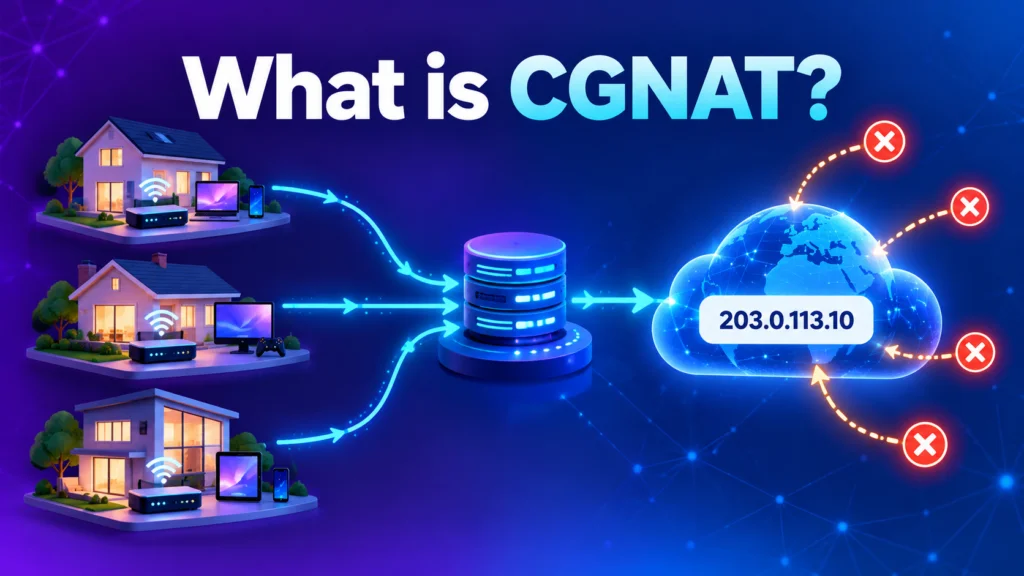
The important question isn’t just “Does my ISP use CGNAT?” It’s “Is CGNAT stopping the thing I’m trying to do, and what’s the simplest way around it?” Here’s how to find out without buying a new router or changing provider on a guess.
Key points
- CGNAT usually doesn’t affect browsing, streaming or video calls.
- It can get in the way when something outside your home needs to start a connection to a device inside it.
- A router address check can point to CGNAT, but VPNs, extra routers and building networks can confuse the result.
- Some UK providers document their CGNAT policies and public-IP options. Others don’t publish enough to confirm either way.
- A public IP address, IPv6 or a private remote-access network may solve the problem. The right choice depends on what you need to connect.
Table of Contents
hide
What CGNAT means for your broadband
 Think of your home router as the front door for your devices. Your phone, TV, console and laptop can all use the connection to reach websites and services. When one of them starts a connection, the network knows where to send the reply.
CGNAT adds another front door, controlled by your provider. Several customers share the same public address. Your router can still send traffic out, but it can’t control the provider’s equipment or decide which customer should receive a new connection arriving from the internet.
That’s the bit that catches people out. Your broadband can be fast and working perfectly for everyday use, while a home server or camera remains unreachable from outside. The connection isn’t necessarily faulty. The route back to your device may simply stop at the provider’s network.
First, what is an IPv4 address?
When you check whether CGNAT might be involved, you’ll compare the router’s internet-facing address with the public address seen by a website. That’s an IPv4 address check.
What is an IPv4 address?
An IPv4 address is a numeric address used by the older, widely supported version of the Internet Protocol. A public IPv4 address can be reached from elsewhere online when the network and firewall allow it. Private IPv4 addresses are used inside local networks, such as your home.
IPv4 uses 32-bit addresses, which allows about 4.3 billion possible combinations. That sounded like a huge number when the system was designed. It wasn’t enough for every internet connection and device to have its own public address as the internet grew.
Providers use CGNAT to stretch that limited supply. Your router may receive a private or shared address, while the provider’s network translates traffic for many customers behind one public IPv4 address. The Internet Engineering Task Force (IETF) set out requirements for this type of carrier-grade translation in RFC 6888.
What is the Internet Engineering Task Force?
The Internet Engineering Task Force (IETF) is an international community that develops and maintains many of the technical standards used to run the internet. Its standards help different networks, devices and services communicate reliably.
One clue is an address in the range 100.64.0.0 to 100.127.255.255. This range is reserved for shared provider networks in RFC 6598. It’s a strong clue, not a complete diagnosis. Providers can use other address ranges, and your own equipment can also create more than one layer of address translation.
Why port forwarding may not work
Port forwarding is a rule on your router. It tells the router where to send a connection that arrives from the internet. It’s useful for some home servers, games and remote-access setups.
But your router’s rule only controls your router. If the incoming connection first reaches your provider’s CGNAT system, your router never gets the chance to apply that rule. It’s like leaving clear directions at your front door when the visitor can’t get past the building’s entrance.
That’s why adding another port-forwarding rule may change nothing. The rule can be correct and still sit behind a connection your router doesn’t control.
What CGNAT can affect, and what it usually won’t
CGNAT matters most when an outside device or service needs to start a new connection into your home.
- Home cameras and storage: Some systems use a relay or start an outbound connection, so they can still work. Others need a direct route back to your home.
- Home servers and remote access: A server that must accept connections from the wider internet may need a public address or another remote-access method.
- Online gaming: Most games that connect to central servers can work normally. Hosting a game, peer-to-peer play, party chat or a console’s NAT status can be affected in some cases. Our guide to broadband for gaming explains what else can affect your setup.
- Work VPNs and voice calls: These often work through CGNAT. Your employer or service may have its own network rules, so check those before changing broadband.
- Websites and account security: Several customers sharing one public IPv4 address can sometimes appear to a website as if they’re coming from the same address. The IETF explains why a shared address alone can’t reliably identify one person or connection in RFC 6269.
CGNAT isn’t a general firewall. It may make unsolicited incoming IPv4 connections harder to establish, but it doesn’t replace your router’s security settings. Keep the router and devices updated, use strong passwords and don’t expose services you don’t need.
How to check if CGNAT may be involved
You can do a useful first check at home. It won’t always prove CGNAT, but it can tell you what to ask your provider.
- Check the router you actually use. If you have a mesh system or a second router, identify which device connects directly to the broadband service. Two routers can create an extra translation inside your home.
- Turn off any VPN or proxy for the check. Otherwise, the address shown by a website may belong to the VPN or proxy, not your broadband connection.
- Find the router’s WAN or Internet IPv4 address. Check the router’s connection or status page. Don’t use the local address shown for your phone, laptop or the router’s home-network side.
- Check the public IPv4 address from a device on the same connection. Use a checker that specifically reports IPv4. If it only shows IPv6, you can’t compare it with the router’s IPv4 address.
- Compare the two addresses. If the router has a private or shared address, or the two public addresses don’t match, there’s another network step to investigate.
Here’s how to read the result:
| Router’s WAN IPv4 address | What it suggests | What to do next |
|---|---|---|
100.64.0.0 to 100.127.255.255 |
The address sits in the range reserved for shared provider networks. | Ask your ISP whether it’s part of its CGNAT system and whether a public IPv4 option is available. |
Private address, such as 10.x.x.x, 172.16.x.x to 172.31.x.x, or 192.168.x.x |
Another router or network is assigning an address upstream. It could be your equipment, a building network or your provider. | Check your router arrangement and cabling first. Then ask your provider to identify the upstream network. |
| Public IPv4 that matches the address checker | Your router appears to have that public address for the connection you tested. | If access still fails, check the router and device firewalls, forwarding rule, service setup and provider restrictions. |
| Different public addresses, but neither is in a shared or private range | The mismatch alone doesn’t prove CGNAT. A VPN, proxy, extra router, multi-WAN setup or a change between checks may explain it. | Repeat the test on the same connection with VPNs and proxies off. Then ask your ISP to confirm. |
Run the comparison at about the same time. Don’t post your full public IP address in a public forum. If you contact support, describe what you’re trying to connect to and share only the details they need through a private channel.
And don’t stop at the address test. A matching public IPv4 doesn’t guarantee that an incoming connection is allowed. A firewall, device setting, application or provider restriction can still block it. Our broadband router guide covers the equipment side.
UK providers that publish CGNAT information
Some providers are clear about their policy. Others leave customers guessing. These examples come from provider help or network pages, but they aren’t a complete list of UK Internet Service Providers (ISPs). Policies can differ between home and business services, packages, networks and customer start dates.
| Provider | What the provider says | Public IPv4 option described |
|---|---|---|
| Community Fibre | CGNAT applies by default to customers who signed up or renewed from 4 June 2026. | It lists a dynamic public-IP add-on for home broadband. Static IPs are described separately for business accounts. |
| Connect Fibre | CGNAT is the default unless the package includes a static IP. | It lists a static-IP add-on and says packages with a static IP don’t use CGNAT. |
| Giant | Its residential IPv4 uses CGNAT, alongside native IPv6. | Giant describes public and static IPv4 options, plus a tunnel service that can provide a Giant public IPv4 address over some other providers’ connections. |
| Quickline | Its help page says home broadband uses CGNAT. | The page says business broadband includes a static IPv4 address. Ask Quickline about options for home service. |
| toob | toob says CGNAT is the standard IPv4 setup on its home broadband. | It describes a static IPv4 add-on for eligible home contracts. Check its current support terms. |
Two providers explicitly say they don’t use CGNAT: Andrews & Arnold (A&A) and Exascale. A&A says “No CGNAT here”. Exascale says its broadband doesn’t use CGNAT. These are confirmed examples, not a complete list of every provider or package.
Before you sign up or switch, ask about the package you’ll actually buy:
- Is its IPv4 address shared with other customers through CGNAT?
- Can I get a public IPv4 address, dynamic or static?
- Is that option available on this home package and at my address?
- Will it allow the incoming connections or port forwarding I need?
- Does it work with my router and firewall setup?
Don’t treat a static-IP offer, an old forum post or one customer’s router test as proof of a provider-wide policy. Ask the ISP to confirm your service.
Related Articles
WiFi Booster vs WiFi Extender: Best UK Options for 2026
WiFi Booster and WiFi Extender Guide: Fix Your Dead Spots Properly in Poor Wi-Fi is one of the most complained-about broadband problems in the UK. Research from Ofcom consistently shows that in-home Wi-Fi issues, including slow speeds, dead spots and unreliable connections, affect millions of households annually, and it’s often nothing to do with the […]
Utility Warehouse Broadband Review 2026
This review covers everything you need to know about Utility Warehouse broadband: the packages, speeds, pricing, customer service, and whether it is the right choice for your household.
What you can do if you need remote access
You don’t have to switch provider as your first move. Start with the service you want to reach. A camera, a game server and your own laptop don’t necessarily need the same fix.
Ask for a public dynamic IPv4 address
A public dynamic IPv4 address isn’t shared behind the provider’s CGNAT, but it can change over time. For many home uses, that’s enough. Dynamic DNS can update a name when the address changes, provided the address is publicly reachable in the first place.
That last part matters. Dynamic DNS doesn’t bypass CGNAT. It keeps track of an address that can already receive incoming connections. Ask the provider whether its public-IP option allows the traffic you need.
What is Dynamic DNS?
Dynamic DNS (DDNS) keeps a web address pointed at your home internet connection when its public IP address changes. It can help you find a home camera or server remotely, but it doesn’t create a route through CGNAT. Your connection still needs an address and provider setup that allow incoming traffic.
Ask for a static public IPv4 address
A static public IPv4 address stays the same. It can help if a work service, remote-access setup or firewall allow-list needs a fixed address. But static doesn’t automatically mean reachable. Confirm that it’s public, not shared, and that the package allows the connections you need.
Use IPv6 if both ends support it
IPv6 is a newer internet protocol with a much larger address space than IPv4. If your broadband, router, device and remote service all support it, they may connect over IPv6 without sharing an IPv4 address.
Your router and device firewalls still matter. IPv6 won’t help if the service you’re connecting to only supports IPv4.
Use a private network or suitable tunnel
If you only need to reach your own devices, a private network such as Tailscale may be simpler than opening a service to the whole internet. A subnet router can extend that private access to devices that can’t run the software themselves. Check the current plan, setup and access controls before relying on it.
Cloudflare Tunnel can make selected web services available through an outgoing connection from your network. It’s not a universal replacement for public IPv4. It won’t suit every game, VPN or network protocol.
Switch only if the other options don’t fit
If you need direct incoming IPv4 and a public-IP add-on, IPv6 or tunnel won’t do the job, look for an ISP or package that clearly offers a public IPv4 address. Confirm it with the provider before cancelling your current service.
Our broadband comparison tool can show packages available at your address. It doesn’t identify CGNAT or public-IP policies, so check that requirement with the ISP before ordering.
Does CGNAT affect gaming?
Sometimes. But a strict NAT message doesn’t prove CGNAT is the cause.
Games using central servers often work as normal. Peer-to-peer play, hosting, party chat or a console’s NAT status can be affected by CGNAT, your router, the game or a combination of them.
Before paying for a public IP, check whether the problem happens in one game or several. Check whether the console sits behind more than one router, and look at the game publisher’s network advice. A public IPv4 may help if the issue is an incoming connection. It won’t fix weak Wi-Fi, line faults, packet loss or a game-server problem.
The bottom line
CGNAT lets your provider share public IPv4 addresses. Most people won’t notice it until they need an outside connection to reach something at home.
Compare the router’s WAN IPv4 with the public IPv4 seen on the same connection. Rule out a VPN or second router. Then ask your ISP to confirm what the address means. If CGNAT is the problem, choose the simplest fix that supports what you’re trying to do. Don’t pay for a new package or switch provider until you know it will solve the problem.
CGNAT Frequently asked questions
Is CGNAT the same as double NAT?
No. Double NAT usually means two routers or devices in your home are translating traffic. CGNAT means your provider also translates traffic in its network. You can have both at the same time.
Does CGNAT slow down broadband or cause packet loss?
Not by itself. CGNAT isn’t a speed measurement, and its presence doesn’t identify why a connection is slow or losing packets. Diagnose those problems separately and ask your provider to check the line and network path.
Will port forwarding fix CGNAT?
Not on its own. Port forwarding controls your home router. If the incoming connection can’t pass the provider’s CGNAT system first, your router won’t receive it. Ask about a public IPv4 address or use a suitable private-access tunnel.
Does a VPN get around CGNAT?
A standard commercial VPN usually changes the route and public address for traffic going out from your devices. That doesn’t automatically make a device at home reachable from the internet. A mesh VPN or remote-access tunnel works differently, so check that it supports the service and equipment you want to reach.
Can dynamic DNS get around CGNAT?
No. Dynamic DNS updates a name when an internet-facing address changes. It can’t direct incoming traffic through your provider’s CGNAT system to your router.
Is CGNAT a security feature?
It can make unsolicited incoming IPv4 connections harder to establish, but don’t treat it as a firewall. Keep your router and device firewalls enabled, install updates and expose only services you understand and need.