
WiFi Booster vs WiFi Extender: Best UK Options for 2026
WiFi Booster and WiFi Extender Guide: Fix Your Dead Spots Properly in 2026
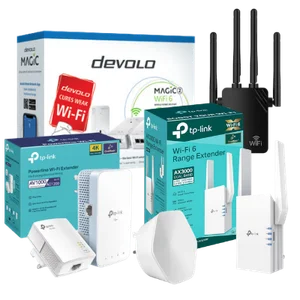 Poor Wi-Fi is one of the most complained-about broadband problems in the UK. Research from Ofcom consistently shows that in-home Wi-Fi issues, including slow speeds, dead spots and unreliable connections, affect millions of households annually, and it’s often nothing to do with the broadband package itself. The router your broadband provider sends you isn’t designed to fill a three-storey Victorian terrace or a 1930s semi with thick plaster walls. That’s where a wifi booster, wifi extender or wifi extender powerline kit comes in.
A wifi booster, wifi extender and wifi extender repeater are often the same hardware with different labels. What matters is whether the device uses a wireless-only backhaul or a wired backhaul via Ethernet or powerline. Powerline-based wifi extenders use your mains wiring to carry signal, which is far more reliable than a pure wireless repeater. ISP-branded boosters from EE, Sky, Vodafone and BT can be convenient but often cost more per month than buying a better third-party extender outright. If your core broadband line is slow or contended, no extender will fix it. A wifi extender can be good for gaming, but only if it uses Ethernet or powerline backhaul.
This guide explains what these devices do, how they work, which models are worth buying from Amazon, Argos and Currys, and whether the wifi booster options from EE, Sky, Vodafone and BT are worth the monthly cost.
Why people end up needing a wifi booster or wifi extender
Most people don’t go looking for a wifi booster because they love home networking, they search for one because the Wi-Fi in their house is ‘doing their head in’. The classic problems are dead spots in bedrooms, patchy signal in loft conversions, buffering on smart TVs in the back room, or a home office setup that falls apart the second a video call starts.
UK homes are often awkward for wireless coverage. Thick brick walls, concrete floors, steel supports in extensions and routers installed in bad locations all damage signal strength. That’s why a broadband package can test fast next to the router but feel awful in real‑world use, particularly if the router hasn’t been set up properly – something covered in our router placement and setup tips.. If your router is in the front room and your gaming console, office desk or kitchen TV is at the other end of the house, signal loss is predictable rather than surprising.
- Signal drops to one bar upstairs or in a rear extension.
- Streaming buffers in bedrooms or on a garden office TV.
- Zoom, Teams or VPN sessions keep dropping in a home office.
- Games lag badly when the console is far from the router.
- Wi-Fi doesn’t properly reach a garage, loft or outbuilding.
- The broadband speed is fine downstairs but poor everywhere else.
If that sounds familiar, a wifi extender or wifi extender powerline kit may help. If the connection is poor even next to the router, the issue is probably your broadband service, not your in-home Wi-Fi.
WiFi booster vs wifi extender vs wifi extender repeater
The terms are messy. Retailers and manufacturers use wifi booster, wifi extender, wifi extender repeater and range extender almost interchangeably.
A wifi repeater is the basic version. It grabs your router’s wireless signal and rebroadcasts it. That sounds useful, but it usually means lower speeds and more latency because the device has to receive and retransmit on the same wireless link.
A wifi extender is often used as a broader term, but the better versions use a wired backhaul (how it connects back to the router) such as Ethernet or mains powerline. That’s a much better setup because the signal doesn’t have to make a double wireless hop.
A wifi booster is mostly a marketing term. Some boosters are repeaters. Some are proper extenders. Some are mesh nodes. Some are powerline kits. Ignore the label and look at the actual connection method.
| Device Type | How It Connects Back to the Router | What It Usually Does Well | Main Weakness |
|---|---|---|---|
| WiFi repeater | Wireless only | Cheap, easy to install, fine for light browsing | Reduces usable speed and adds latency |
| WiFi extender | Wireless or wired, depends on model | Can improve room-to-room coverage | Wireless-only models still lose performance |
| WiFi extender powerline | Mains electrical wiring | Better for thick walls, gaming and multi-floor homes | Performance depends on your home’s wiring |
| Mesh node | Usually wireless, sometimes wired | Better roaming across the whole house | Costs more than a basic extender |
How a wifi extender powerline kit works
A wifi extender powerline kit normally includes two adapters. One plugs in near your router and connects by Ethernet. The other plugs in where you need better coverage. The two units send data through your home’s electrical wiring, then the second unit creates Wi-Fi in that room and often provides Ethernet ports as well.
This is usually far better than a basic repeater in UK homes with thick internal walls or difficult layouts. The signal isn’t trying to punch through brick and plaster all the way from the front room to the top floor. Instead, it rides the wiring and only becomes Wi-Fi again where you need it.
Powerline isn’t magic. Old or messy wiring can reduce speeds, and if the sockets are on awkward circuits the results can be mixed. If you want a wifi extender good for gaming or a stronger connection in a back office, powerline is often the smartest option before you start spending big money on mesh.
Related Articles

5g Broadband Internet
Is 5G Broadband Actually Worth It? 5G broadband is fixed wireless access (FWA). A router at your address connects to the nearest 5G mast over the same radio spectrum used for mobile data, then converts that signal into…
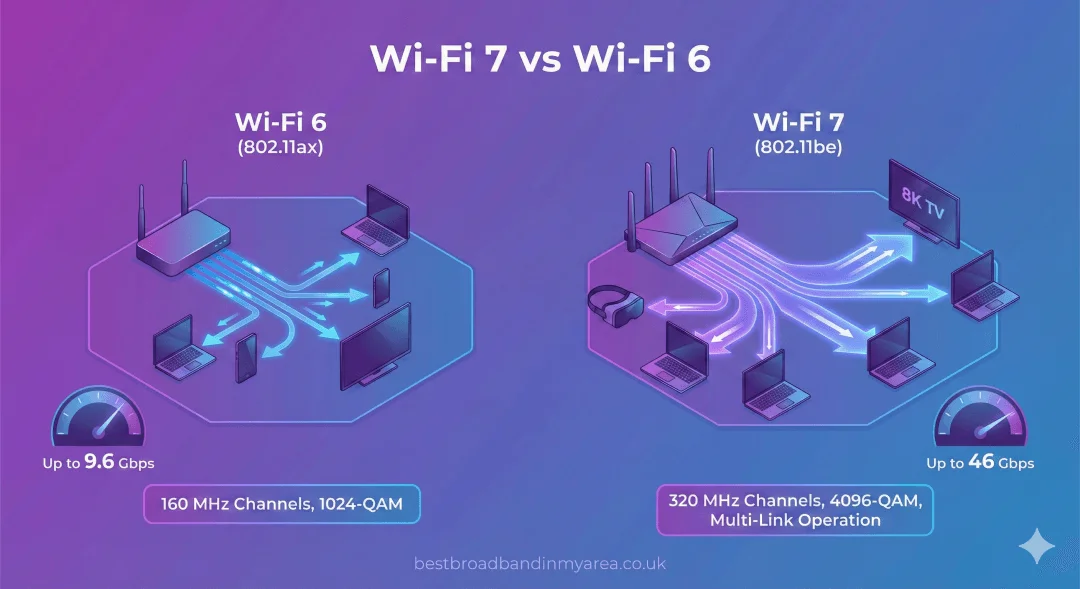
Wi-Fi 7 vs Wi-Fi 6
The Next Generation of Wireless Connectivity: Wi-Fi 7 vs Wi-Fi 6 Wi-Fi 7 is the latest wireless standard offering a massive leap in speed, reliability, and efficiency. With speeds up to 46 Gbps and new features like Multi-Link Operation, it’s a significant upgrade from Wi-Fi 6, designed for the future of high-bandwidth activities like 4K […]
Best wifi boosters and powerline adapters from Amazon, Argos and Currys
These four picks cover the most common needs. One is the best-value standard wifi extender. One is the strongest premium powerline choice. One is a solid mid-range mesh-style extender and the last is the budget powerline option that makes sense for people who need better reliability without spending a fortune.
TP-Link RE700X AX3000 WiFi 6 Extender
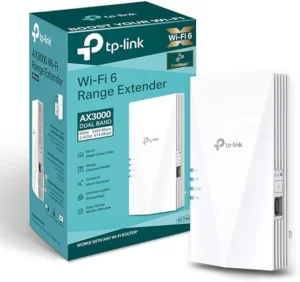 The TP-Link RE700X is one of the strongest all-round wifi extender options for most UK homes. It supports Wi-Fi 6 and has a combined theoretical AX3000 rating, which is more than enough for normal family use, heavy streaming and a good chunk of gaming setups. In the real world, what matters is that it’s fast enough to take a decent signal from your router and push it further into the house without falling apart the second you connect more than a couple of devices.
The setup is straightforward. TP-Link’s Tether app is simple, and the unit can also be paired via WPS if you want the faster route. There’s a Gigabit Ethernet port on the side, which matters more than people think. If you’ve got a console, desktop PC or smart TV in a room with poor Wi-Fi, you can plug it directly into the RE700X and avoid relying on the device’s own wireless chip.
It’s not dirt cheap junk and it’s not priced like a whole-home premium kit either. It makes sense for typical semis, terraces and medium-size detached houses where you need better signal in one or two problem areas.
The weakness is that it’s still relying mainly on wireless backhaul unless you use it in access point mode. If the incoming signal is already weak, the outgoing signal won’t be brilliant either. That’s the fundamental limit of this kind of extender. If your dead spot is severe or your house layout is complex, a powerline kit will usually beat it.
Best for: Most homes, general use, casual gaming, streaming.
Where to buy: Amazon, Currys.
Typical price: Around £64.
What does AX3000 rating mean?
AX3000 is a simple way of saying a Wi‑Fi 6 extender or router can handle up to about 3,000 Mbps of combined wireless speed across all its bands. In practice, it doesn’t mean you will ever see 3,000 Mbps on a single device. Instead, it means the hardware has enough capacity to serve multiple phones, laptops, TVs and consoles at the same time without slowing down as quickly as lower‑rated models.
Devolo Magic 2 WiFi 6 next Powerline Kit
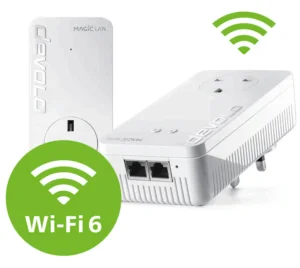 The Devolo Magic 2 WiFi 6 next is the serious option. This isn’t the one you buy because your bedroom signal is a bit weak. This is the one you buy because your house is large, awkward, built like a bunker, or because you work from home and can’t tolerate flaky Wi-Fi anymore. It combines Wi-Fi 6 with G.hn powerline backhaul, which means it’s using your electrical wiring to move data and then broadcasting fresh Wi-Fi at the far end. That makes it a much stronger solution than a cheap repeater.
Thick walls and concrete floors don’t matter nearly as much because the signal isn’t trying to travel through them wirelessly. Review coverage has consistently pointed to strong stability and reliable whole-home performance rather than silly headline speed claims. That’s exactly what you want from this sort of kit.
If a garden office or garage shares your mains circuit, this sort of kit can give you much more usable performance than a normal repeater. The Ethernet ports on the adapters are a big deal too. A gaming PC or console plugged directly into the remote unit will usually perform much better than it would on weak Wi-Fi.
The obvious drawback is cost. This is expensive hardware. For a small flat or a house with one mild dead zone, it’s overkill but if you’ve already wasted money on poor extenders and still have terrible coverage, this is the kind of upgrade that actually solves the problem instead of masking it.
Best for: Large homes, thick walls, multi-floor properties, gaming, remote work.
Where to buy: Amazon, Currys, devolo.co.uk.
Typical price: Around £209.99.
What is G.hn powerline?
G.hn is a modern international standard for sending data over existing wiring in a building, including mains electrical cables, coaxial cables and even phone lines. Unlike older HomePlug AV powerline standards, G.hn is designed to be more efficient and less prone to interference, so it can deliver higher real-world speeds and more stable performance over longer distances. In practice, that means G.hn-based powerline adapters are better at turning the wiring in your walls into a high-speed network link, especially in larger homes or properties with more complex electrical layouts.
Netgear EAX20 AX1800 WiFi 6 Mesh Extender
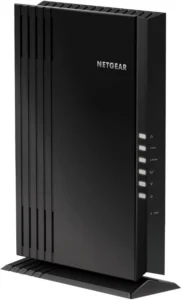 The Netgear EAX20 is a good middle-ground choice. It’s more capable than a basic plug-in repeater and more affordable than a premium powerline system. It supports Wi-Fi 6, works well with Netgear’s wider ecosystem, and gives you multiple Ethernet ports on the device itself, which is a proper advantage if you’ve got more than one fixed device in the same room.
This sort of extender makes sense in homes where the dead spot isn’t too extreme. If the router signal is still reasonably healthy in the hallway or landing outside the weak room, the EAX20 can take that signal and stretch it properly. That’s a decent setup for a back bedroom used as an office, a gaming room upstairs, or a TV room at the far end of the house.
The presence of three Gigabit Ethernet ports gives it more flexibility than most wall-plug extenders. That’s useful if you want to hardwire a console, a TV box and maybe a desktop PC all into one point. In that sense it does more than a simple wifi extender plug and starts to feel like a room-level connectivity hub.
The downside is still the same old rule: wireless in, wireless out. If you place it badly, performance drops. That’s not a fault unique to Netgear. It’s just how this class of hardware works. It’s a smart option for medium-demand homes, but it’s not the first thing I’d recommend for someone with brutal wall materials or big performance demands.
Best for: Mid-range homes, multi-device rooms, office and streaming setups.
Where to buy: Amazon, Currys, sometimes Argos.
Typical price: Around £70 to £90.
TP-Link TL-WPA7517 KIT AV1000 Powerline WiFi Extender
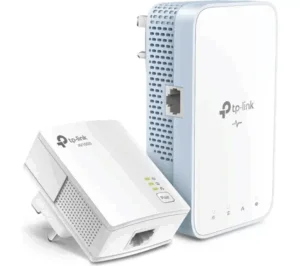 The TP-Link TL-WPA7517 KIT is the value pick for people who need the benefits of powerline but don’t want to spend Devolo money. It combines AV1000 powerline with dual-band Wi-Fi and gives you a clean route to improve coverage in a difficult room without turning the project into a major expense.
You get the more stable wired-style backhaul through the mains, then Wi-Fi and Ethernet at the far end. That makes it a better bet for gaming and video calls than a cheap repeater, even though the marketing numbers are less flashy than some wireless extenders.
The setup is refreshingly simple. Plug one unit in by the router, connect it by Ethernet, plug the other in where you need it, pair them, done. The passthrough socket is also useful because you don’t lose the wall outlet completely. For a lot of buyers, that’s the kind of practical detail that matters more than an extra line of technical jargon on the product page.
This isn’t the best option for every home. If your wiring is old or awkward, performance can vary more than on premium powerline kits, but for plenty of UK homes built or rewired in the last few decades, this is a strong budget-friendly fix that does a proper job.
Best for: Budget powerline needs, gaming, back rooms, outbuildings on the same circuit.
Where to buy: Amazon, Argos, Currys.
Typical price: Around £40 to £70.
Quick comparison of the best wifi boosters and extenders
| Product | Type | Best For | Typical Price | My Verdict |
|---|---|---|---|---|
| TP-Link RE700X | Wi-Fi 6 extender | Most homes with one or two weak spots | ~£64 | Best-value standard extender |
| Devolo Magic 2 WiFi 6 next | Powerline + Wi-Fi 6 | Large homes, gaming, remote work | ~£209.99 | Best premium fix for difficult homes |
| Netgear EAX20 | Wi-Fi 6 mesh-style extender | Mid-range multi-device rooms | ~£70–£90 | Strong all-round mid-tier choice |
| TP-Link TL-WPA7517 KIT | Powerline Wi-Fi extender | Budget powerline use, gaming, outbuildings | ~£40–£70 | Best-value powerline option |
WiFi booster options from UK broadband providers
Some people don’t want to mess around with third-party kit at all. That’s where ISP-branded boosters come in. They appeal because they work within the provider’s own router ecosystem and support team. The trade-off is simple: you usually pay more over the life of the broadband contract.
EE Smart WiFi booster
 EE’s Smart WiFi setup pairs EE’s router with a wireless booster disc. It’s designed to improve room-to-room coverage rather than act like a full powerline-style hard extension. That makes it fine for standard homes with moderate coverage issues, especially where the problem is one room away from a decent signal rather than a completely cut-off part of the house.
Setup is easy. EE’s app does most of the work, and the system is clearly aimed at normal households rather than networking enthusiasts. That’s a positive, not a criticism. Most people want working Wi-Fi, not a new hobby.
The problem is the same as with other wireless-only extenders. If the booster disc is fed a weak signal, it can only pass on a weak signal. That makes EE’s setup less convincing in larger homes or houses with tough building materials. In those cases, a powerline option will often do a better job.
EE’s wifi booster setup makes most sense if you’re already taking one of EE’s stronger broadband packages and want a neat add-on that works with the provider’s own hardware. If you just want the cheapest fix, a third-party extender is often better value.
Sky WiFi Max and Sky boosters
![WiFi Booster vs WiFi Extender: Best UK Options for [wpdts-custom format="Y"]](https://bestbroadbandinmyarea.co.uk/wp-content/uploads/sky-broadband-crsl1-png.webp "WiFi Booster vs WiFi Extender: Best UK Options for [wpdts-custom format=\"Y\"] 10") Sky’s answer to weak home Wi-Fi is tied into its WiFi Guarantee and WiFi Max setup which are also available as Add-ons on Sky broadband packages. The idea is simple if your Wi-Fi doesn’t perform well enough throughout the home, Sky can provide boosters as part of the service, depending on the package and support process.
Sky’s answer to weak home Wi-Fi is tied into its WiFi Guarantee and WiFi Max setup which are also available as Add-ons on Sky broadband packages. The idea is simple if your Wi-Fi doesn’t perform well enough throughout the home, Sky can provide boosters as part of the service, depending on the package and support process.
This is a decent option for people already deep in the Sky ecosystem, especially homes using Sky TV services heavily. The router and extender combination is designed to work together cleanly, and that’s worth something. Plenty of people would rather pay Sky monthly than buy standalone hardware and troubleshoot it themselves.
The downside is cost over time. A monthly add-on sounds harmless until you stretch it over a full contract. That’s where Sky’s booster setup starts to look expensive next to a one-off purchase like a TP-Link extender. That’s the bit a lot of buyers miss.
Sky’s wifi booster approach is fine if you want convenience and support. It’s not the best-value route for everyone. If you only need better signal in one room, buying your own extender is often the smarter move.
Vodafone Pro WiFi extenders
![WiFi Booster vs WiFi Extender: Best UK Options for [wpdts-custom format="Y"]](https://bestbroadbandinmyarea.co.uk/wp-content/uploads/vodafone-broadband-crsl1-png.webp "WiFi Booster vs WiFi Extender: Best UK Options for [wpdts-custom format=\"Y\"] 11") Vodafone’s Pro broadband plans come with a stronger router setup and Wi-Fi extenders designed for broader home coverage. This is one of the more convincing ISP-managed systems because it’s positioned as part of a premium package rather than a token bolt-on.
Vodafone’s Pro broadband plans come with a stronger router setup and Wi-Fi extenders designed for broader home coverage. This is one of the more convincing ISP-managed systems because it’s positioned as part of a premium package rather than a token bolt-on.
That matters because you are paying for it one way or another. Vodafone Pro isn’t cheap but unlike some weaker add-on systems, this one is at least trying to solve the whole-home Wi-Fi problem properly rather than just selling a branded disc on top of an average package.
For people working from home, running lots of devices, or dealing with a busy family network, Vodafone Pro makes decent sense. The Wi-Fi 6 element is also important because it keeps the home network more current than older ISP router setups.
Still, don’t kid yourself that the included extenders are free. You’re paying through the package price. That’s fine if the broadband deal is strong overall. It’s poor value if a cheaper provider plus a £50 to £60 third-party extender would solve the same problem.
BT Complete WiFi
![WiFi Booster vs WiFi Extender: Best UK Options for [wpdts-custom format="Y"]](https://bestbroadbandinmyarea.co.uk/wp-content/uploads/bt-broadband-crsl1-png.webp "WiFi Booster vs WiFi Extender: Best UK Options for [wpdts-custom format=\"Y\"] 12") BT Complete WiFi uses disc-style extenders to improve coverage around the home. BT has pushed this for years as the answer to patchy signal in larger homes, and the offer comes with a coverage guarantee and extra discs if required.
BT Complete WiFi uses disc-style extenders to improve coverage around the home. BT has pushed this for years as the answer to patchy signal in larger homes, and the offer comes with a coverage guarantee and extra discs if required.
The strongest selling point is simplicity. BT customers who don’t want to think about networking can buy into one ecosystem, call one provider and get support through the same channel as their broadband. For a lot of households, that’s attractive.
The issue is value. Over the length of a broadband contract, BT Complete WiFi can cost more than buying decent third-party hardware outright. That doesn’t mean it’s bad. It means it needs to be judged as a service, not as a cheap fix.
There’s also the bigger point people often miss. If you’re on an older FTTC package and the broadband speed at the router is already mediocre, there’s a limit to what any Wi-Fi system can achieve. Better in-home coverage doesn’t create faster broadband out of thin air.
| ISP | Booster Service | How It’s Sold | What It’s Best For | Main Drawback |
|---|---|---|---|---|
| EE | Smart WiFi | Package-linked add-on or inclusion | Standard homes with mild coverage issues | Still wireless backhaul |
| Sky | WiFi Max / Boost | Monthly add-on | Sky households wanting one-system support | Can get expensive over contract length |
| Vodafone | Pro WiFi extenders | Included in Pro packages | Premium whole-home coverage needs | Higher package cost |
| BT | Complete WiFi | Monthly add-on | BT customers wanting managed support | Poor value if a one-off third-party fix would do |
Is a wifi extender good for gaming?
A wifi extender can work for gaming, but only if it keeps latency under control. cheap wireless repeater usually adds lag and can make fast online games worse, which is why many players look at broadband options built for gaming instead. A wifi extender powerline kit with Ethernet at the far end is usually the better option because it gives you a more stable, lower-latency connection. If powerline isn’t practical, a good Wi-Fi 6 extender placed properly and connected to your console by Ethernet is the next best choice.
Gaming is where bad extender advice falls apart. Loads of extenders look fine on a speed test and still perform badly in real games because ping consistency matters more than flashy Mbps claims. That’s why cheap wireless repeaters are usually the wrong answer for serious gaming.
The best setup is simple. Use powerline if possible. Plug the console or gaming PC into the far-end adapter by Ethernet. That gives you the closest thing to a wired connection without running cable through the house. If powerline doesn’t work in your property, use a decent Wi-Fi 6 extender with Ethernet and place it where the incoming signal is still strong.
If gaming matters a lot to you, it’s also worth checking whether your broadband package itself is the limiting factor. A wifi booster can’t fix poor latency caused by a weak broadband service.
Should you buy a wifi booster or switch broadband instead?
If your Wi-Fi is poor only in certain rooms, a good wifi extender or wifi extender powerline kit can make a big difference. If the broadband is poor even when you’re right next to the router, stop looking at boosters and start looking at your broadband provider instead. That’s the blunt truth.
For most households, the TP-Link RE700X is the best-value general wifi extender. The TP-Link TL-WPA7517 KIT is the best-value powerline choice. The Netgear EAX20 is a good middle-ground option if you want stronger room-level connectivity and more Ethernet ports. The Devolo Magic 2 WiFi 6 next is the premium pick when you just want the problem solved properly and you’re willing to pay for it.
- Buy a standard extender if you have one or two weak spots and a decent incoming router signal.
- Buy a powerline extender if thick walls, multiple floors or gaming performance are the real problem.
- Use an ISP booster if you want convenience, support and a joined-up setup.
- Switch broadband if the connection is poor at the router, your package is outdated or your provider’s hardware is weak, and the process is now simpler thanks to how broadband switching works in the UK.
If you’re unsure which camp you’re in, check your postcode first and compare full fibre deals available in your area. A stronger router and faster full fibre package can sometimes solve more than a shelf full of extenders ever will.
WiFi Booster & Extender FAQs
Still unsure whether a wifi booster, wifi extender or powerline kit is right for your home? These FAQs cover the most common questions about speed, gaming, placement, compatibility and performance so you can choose the right fix for your Wi-Fi problems.
Do WiFi boosters actually work?
WiFi boosters work when the problem is weak wireless coverage rather than slow broadband. If your speed is fine next to the router but devices struggle in certain rooms, a good booster or extender can improve signal strength and reliability in those spots.
They won’t fix a slow or heavily congested broadband line. If tests near the router are already poor, the real solution is a better package or provider, not extra hardware.
What is the difference between a WiFi booster, WiFi extender and WiFi repeater?
“WiFi booster” is a broad marketing term used for any device that increases wireless coverage. A WiFi extender usually creates another access point using either a wired backhaul, such as Ethernet or powerline, or a wireless link.
A WiFi repeater is the simplest type of extender. It receives the router’s WiFi and rebroadcasts it on the same band. That double hop often halves usable throughput and increases latency, so repeaters are generally fine for light browsing but less suitable for gaming or 4K streaming.
Will a WiFi booster reduce my internet speed?
Wireless-only boosters and repeaters typically reduce speeds for devices connected through them because they receive and transmit on the same radio, effective throughput is often much lower than at the router.
Extenders with wired backhaul behave better. When the link back to the router runs over Ethernet or powerline, the extender’s WiFi is free to serve devices without splitting capacity between backhaul and clients, so speeds feel closer to those at the router.
Where should I place my WiFi extender for best results?
Don’t put the extender in the dead zone. It needs a strong signal from the router to pass on anything useful. The usual rule is to place it roughly halfway between the router and the problem area, where its signal-strength indicators show a good connection.
Powerline extenders should be plugged directly into wall sockets, not extension leads, and the remote adapter goes in the room you care about. From there you can either rely on the extender’s WiFi or cable devices to it.
Can a WiFi extender work with any router?
Most WiFi extenders work with any mainstream router as long as they can join the existing network using its SSID and password or WPS. They don’t normally need special settings on the router to start extending coverage.
Vendor-specific features like mesh roaming only work with matching brands, but the basic function of improving coverage still works even if your router and extender are from different manufacturers.
Is it better to buy my own WiFi extender or get one from my ISP?
Buying your own WiFi extender is usually cheaper over a full contract and gives you more choice. A solid WiFi 6 or powerline extender is a one-off cost, whereas ISP boosters often come as monthly add-ons that add up over time.
ISP options are mainly about convenience. They integrate tightly with the provider’s router and support process, and may come with coverage guarantees. If you value a single, managed system more than saving money, that trade-off can be acceptable.
Will a WiFi booster help if my broadband is slow?
A WiFi booster can’t make your broadband faster than what reaches the router. It can only redistribute existing bandwidth more effectively around your home.
If speeds are poor even when wired or standing next to the router, adding a booster won’t meaningfully change that. In that scenario you need to look at upgrading your package, moving to full fibre, or changing provider.
Are WiFi boosters and extenders safe from hackers?
WiFi boosters and extenders are generally safe if they are configured properly and kept up to date. Most modern models support the same security standards as routers, including WPA2 or WPA3, so the main protection still comes from using a strong password and secure settings.
The biggest risk is outdated firmware. Security researchers have found serious flaws in older extender models when updates were not installed, including vulnerabilities in some TP-Link and Netgear devices. If you add an extender to your network, change the admin password, disable remote management unless you really need it, and check for firmware updates from time to time.
Do powerline WiFi extenders work in old UK houses?
Powerline extenders can work well in older UK houses, but their performance depends on wiring quality and layout. In properties with reasonably modern circuits and sockets on the same ring, they often deliver stable throughput suitable for streaming and gaming.
In homes with very old, mixed or heavily spurred wiring, results can be less predictable. Noise from appliances and long runs can reduce speeds, so it’s sensible to test with a mid-range kit before committing to a large system.
Is an AX3000 WiFi 6 extender or router overkill for my broadband speed?
AX3000 describes the total wireless capacity of a WiFi 6 device, not the speed any single device will see. Even on a 100–300 Mbps broadband line, an AX3000 router or extender can be useful because it handles many devices more efficiently and supports modern features like OFDMA.
If you have only a few devices and a modest connection, you might not notice a huge difference compared with a good WiFi 5 unit. In busy households with lots of concurrent streams, downloads and games, the extra capacity and better handling of congestion can make the network feel much smoother even though the broadband speed itself is unchanged.
Can a WiFi extender interfere with my router or neighbours’ WiFi?
Yes, it can. A wireless repeater or extender adds extra traffic to the same airwaves your router is already using, and in busy areas that can increase congestion. This is especially true on 2.4 GHz, where many neighbouring networks, smart devices and household gadgets are already competing for space.
That does not mean extenders are a bad idea, but it does mean placement and channel choice matter. If you live in a flat or dense housing area, using 5 GHz where possible and avoiding heavily crowded channels can reduce interference.
Do WiFi boosters work properly with smart-home devices?
In most homes, yes. Smart-home devices such as bulbs, plugs, thermostats and cameras usually connect over 2.4 GHz, and a properly configured extender can make them more reliable by giving them a stronger signal in rooms that were previously on the edge of coverage.
Problems usually appear when the router and extender use separate network names or when coverage overlaps poorly and devices keep switching between them. In those cases, keeping the same SSID and password across the network usually gives the smoothest experience.
Will using a WiFi booster affect my data cap or fair-usage policy?
A WiFi booster does not change how your ISP measures data usage. It simply spreads your existing connection around the home more effectively, so any downloads, streams or gaming traffic still count exactly the same as if they came straight from the router.
What can change is your behaviour. If better coverage means people in your home start streaming in more rooms or using devices that previously could not stay connected, your household may end up using more data overall.
How hard is it to install a WiFi booster or extender?
Most standard plug-in extenders are easy to install. You usually plug the device into a socket, connect it with WPS or an app, choose your network and enter the WiFi password. In many cases, the whole setup takes less than ten minutes.
Powerline extenders take slightly longer because one adapter must connect to the router by Ethernet and another must be paired in the target room. Even so, they are still simple enough for most households to set up without expert help.
Do I need more than one WiFi booster for a three-storey house?
Sometimes yes. In a smaller three-storey house, one well-placed extender may be enough if the router is in a central position and signal only needs a modest boost.
In larger or older properties with thick walls and awkward layouts, one booster often is not enough. That is where people usually move to a multi-node mesh system or use more than one wired or powerline-backed access point so each floor has more consistent coverage.